

What it is
Make your store legible to AI agents
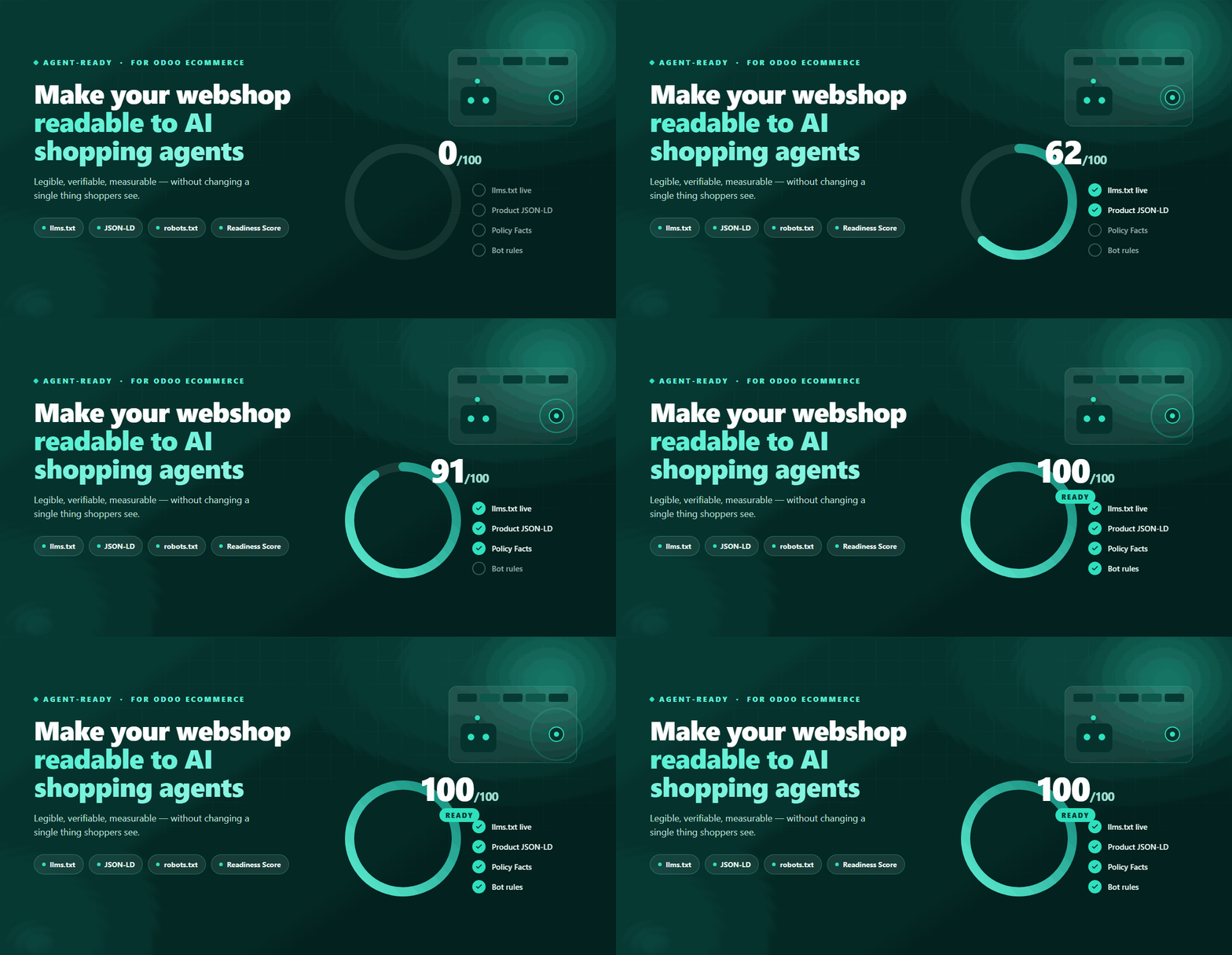
Agent-Ready makes an Odoo website_sale store legible, verifiable and measurable for AI shopping agents — ChatGPT, Claude, Perplexity, Google AI and more — without changing anything human shoppers see.
AI assistants increasingly browse and compare products for their users. But a normal storefront is built for humans and search engines, not agents — so agents miss prices, availability, shipping and return rules, and brand identity, or can't tell your store is even shoppable. Agent-Ready publishes the machine-readable signals agents rely on, and gives you controls plus measurement.
What it does — six things
- 1Publishes an `llms.txt` map of your store.
- 2Emits complete schema.org JSON-LD (Product/ProductGroup, Offers, Organization, WebSite, ItemList).
- 3Lets you enter Merchant Policy Facts (shipping, returns, support) once, reused everywhere.
- 4Gives an AI Bot Registry + robots.txt control (allow/deny known AI bots).
- 5Verifies signed agents (Web Bot Auth) and labels them.
- 6Logs Agent Traffic analytics and computes a 100-point Readiness Score.
Runs inside your Odoo
No external SaaS, no hosted service, no data sent to third parties. Everything lives in your own database.
Compatibility
Odoo 17.0, 18.0, 19.0, Community & Enterprise. Depends on website_sale; multi-website aware; fail-open by design.
After install, you'll find it here:
The menu holds Readiness Score, Agent Traffic and AI Bot Registry, plus a settings section under Website → Configuration → Settings.
Getting started
Live in three steps
Install-time signals come online immediately — the rest is filling one form and watching the score climb.
Install the module
Apps → search “Agent-Ready” → Install. /llms.txt, JSON-LD, and the bot registry come online immediately. No theme changes, no code.
Set your Policy Facts
Once, in Website → Configuration → Settings → Agent-Ready (shipping, delivery, returns, support — every field has a one-line explainer in Odoo).
Measure & improve
Open the Readiness Score, act on each checklist item, and watch agent traffic appear in Agent Traffic. Aim for 100.
The hero feature
Agent Readiness Score
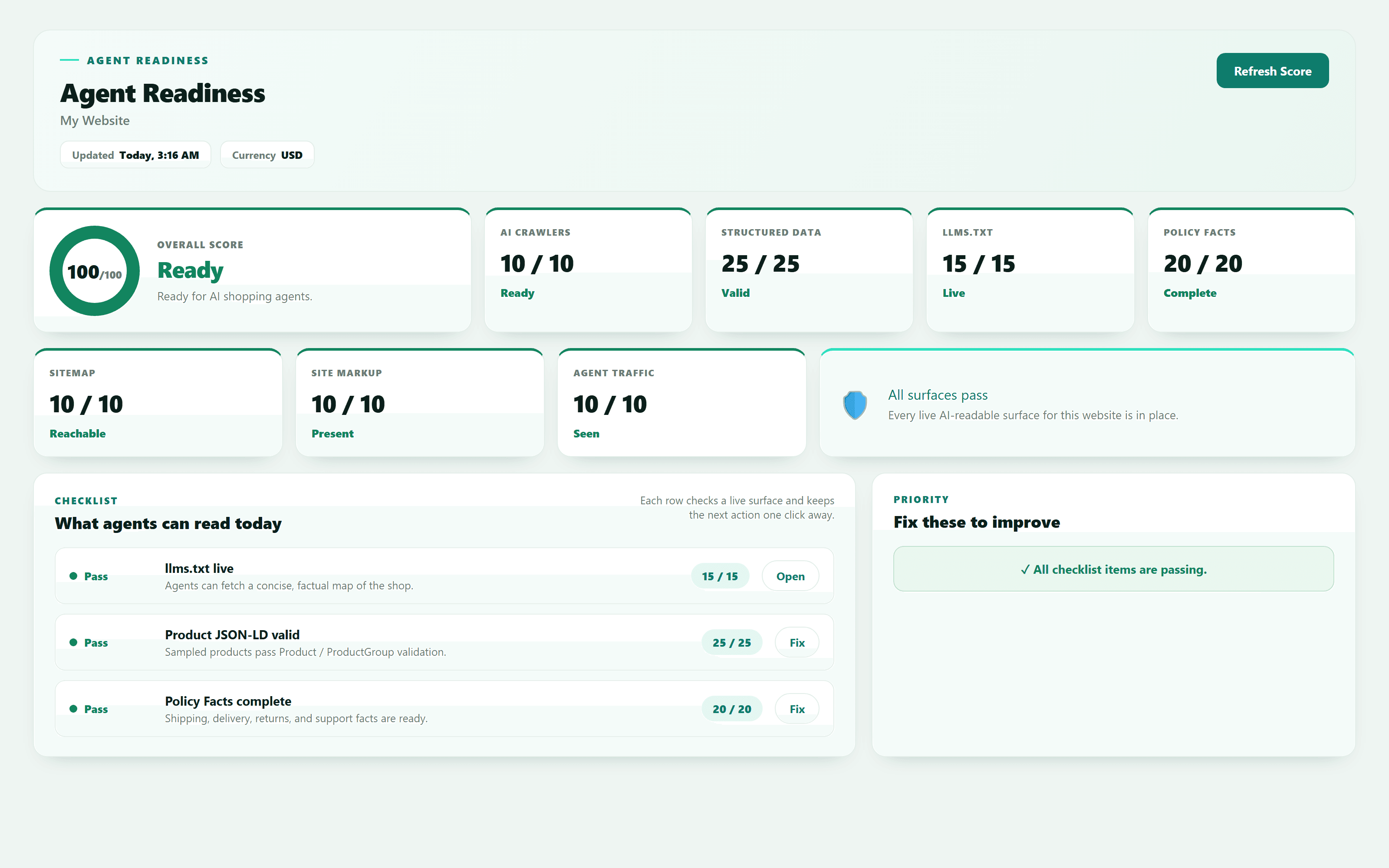
A single 0–100 score that checks the live surfaces agents depend on and turns them into an honest number — with a direct fix action for each item.
The dashboard shows a score ring, a row of category cards (green / amber / red status), a checklist, and a “Fix these to improve” priority list of failing items with Major / Minor tags.
Click Refresh Score to recompute.
The 7 checks and their points (total 100)
| Check | Points | What it verifies |
|---|---|---|
| llms.txt LiveAgents can fetch /llms.txt for this website. | 15 | Agents can fetch /llms.txt for this website. |
| Policy Facts CompleteShipping, delivery, return, and support facts are filled in. | 20 | Shipping, delivery, return, and support facts are filled in. |
| Product JSON-LD ValidSampled published products, fetched from real public pages, emit valid Product/ProductGroup JSON-LD. | 25 | Sampled published products, fetched from real public pages, emit valid Product/ProductGroup JSON-LD. |
| Bots ConfiguredActive AI Bot Registry records apply to this website. | 10 | Active AI Bot Registry records apply to this website. |
| Sitemap Includes Products/sitemap.xml is reachable and contains published product URLs. | 10 | /sitemap.xml is reachable and contains published product URLs. |
| Organization/WebSite MarkupThe public homepage renders Organization and WebSite JSON-LD. | 10 | The public homepage renders Organization and WebSite JSON-LD. |
| First Agent Visit RecordedAt least one known-bot or signed-agent request has been logged. | 10 | At least one known-bot or signed-agent request has been logged. |
| Total | 100 |
How the JSON-LD check works
Settings
Merchant Policy Facts
The operational facts agents need. Enter them once, and Agent-Ready reuses them in llms.txt and in the shipping / return blocks of product JSON-LD.
Only your facts, never invented
Field reference
| Field | Meaning |
|---|---|
| Ships To | Country groups this website ships to; used in AI-readable shipping policies. |
| Handling Days | How many days you need to prepare an order before it ships. |
| Delivery Days (Min) | Shortest delivery estimate after the order ships. |
| Delivery Days (Max) | Longest delivery estimate after the order ships. |
| Free Shipping Threshold | Order total at which this website offers free shipping. |
| Return Window (Days) | How many days customers have to start a return. |
| Return Method | What customers receive when a return is accepted (e.g. refund type). |
| Support Email | Email shoppers/agents should use for support. |
| Support Phone | Phone shoppers/agents should use for support. |
| Support Hours | When support is available, e.g. “Mon–Fri 9:00–17:00”. |
| Enable /llms-full.txt | Publishes /llms-full.txt with product lines for AI shopping agents (optional). |
| Replace Odoo Product Structured Data | Keeps breadcrumbs but removes Odoo’s built-in Product JSON-LD so Agent-Ready is the single source of truth (recommended ON to avoid duplicate/competing markup). |
| Agent Visit Retention | Number of days to keep privacy-lean agent-visit analytics before automatic cleanup. |
Governance
AI Bot Registry
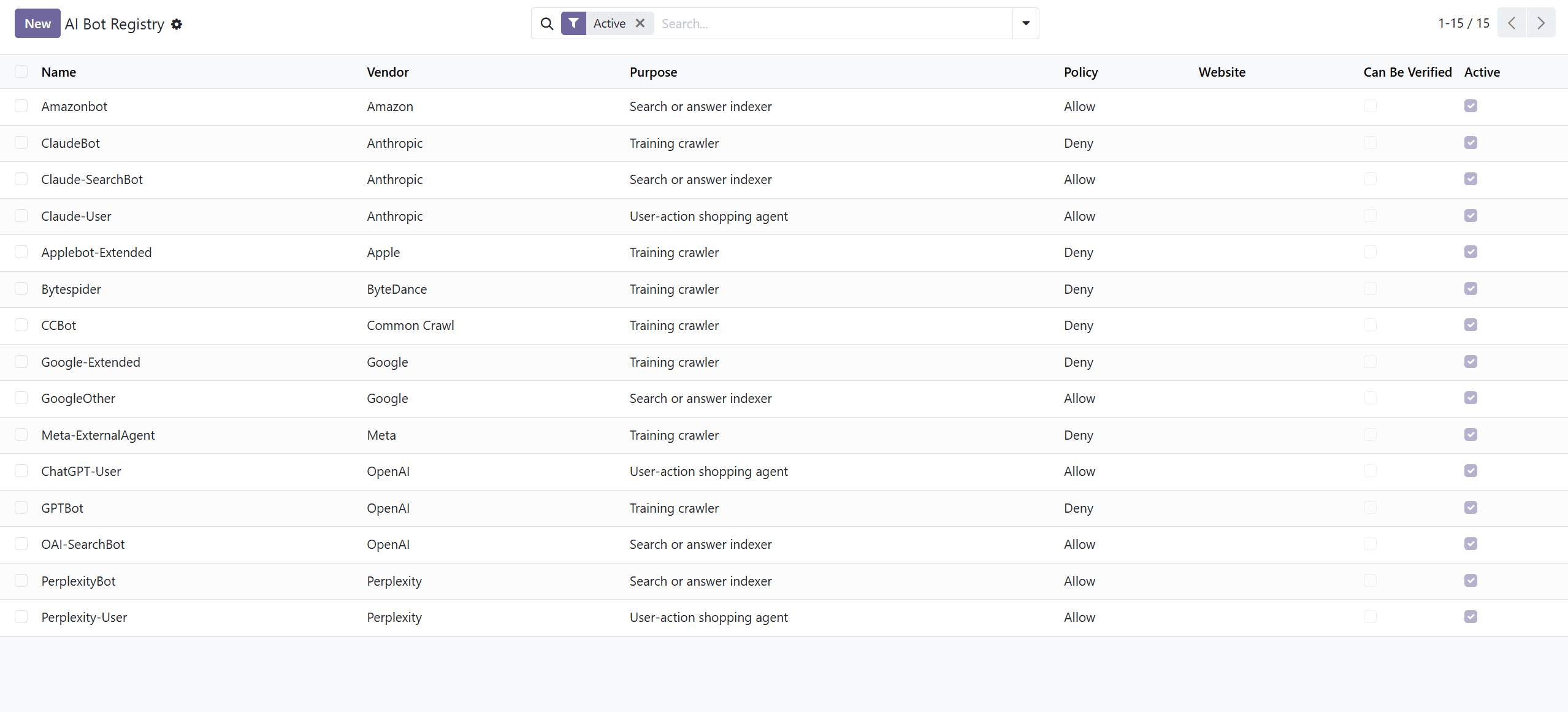
A rulebook, not a visit log. It's the master list of known AI bots and your policy for each one.
Registry vs Agent Traffic — the #1 mix-up
It does three jobs
- 1Writes robots.txt— each bot's Allow / Deny becomes a rule in your
/robots.txt. - 2Powers recognition in analytics — the User-Agent Pattern is how the module identifies a visiting bot and labels it in Agent Traffic. A bot not in the registry isn't recognized.
- 3Holds the verification domain used to check signed (Web Bot Auth) agents.
Why are bots already registered?
The app ships with the common known AI bots pre-seeded, so you're governed and measuring from day one — no research required. Each has a sensible default Allow / Deny you can change.
Why the “New” button?
The AI crawler landscape changes fast. When a brand-new botappears that isn't in the list, click New, give it a User-Agent Pattern and an Allow / Deny policy. From then on the module can (a) add a robots.txt rule for it and (b) recognize and label it in Agent Traffic. Without adding it, the module has no way to know that User-Agent is an AI bot.
Field reference
| Field | Meaning |
|---|---|
| Name | Human-readable bot name shown to store managers. |
| Vendor | Company or project that operates this bot. |
| User-Agent Pattern | Regex used to recognize this bot; use a literal bot token for robots.txt rules. |
| Purpose | Why it visits: Training crawler / Search or answer indexer / User-action shopping agent. |
| Policy | Allow or Deny — the robots.txt posture Agent-Ready emits (when no merchant rule already exists). |
| Signature Agent Domain | Verification domain for signed agent requests; leave empty unless the vendor publishes one. |
| Can Be Verified | Whether this bot is expected to support signed-request verification. |
| Capabilities | Future hook for declared agent capabilities. |
| Active | Uncheck to keep the record but stop matching it and stop its robots.txt output. |
| Website | Optional per-website override; leave empty to apply the policy to every website. |
Output
robots.txt control
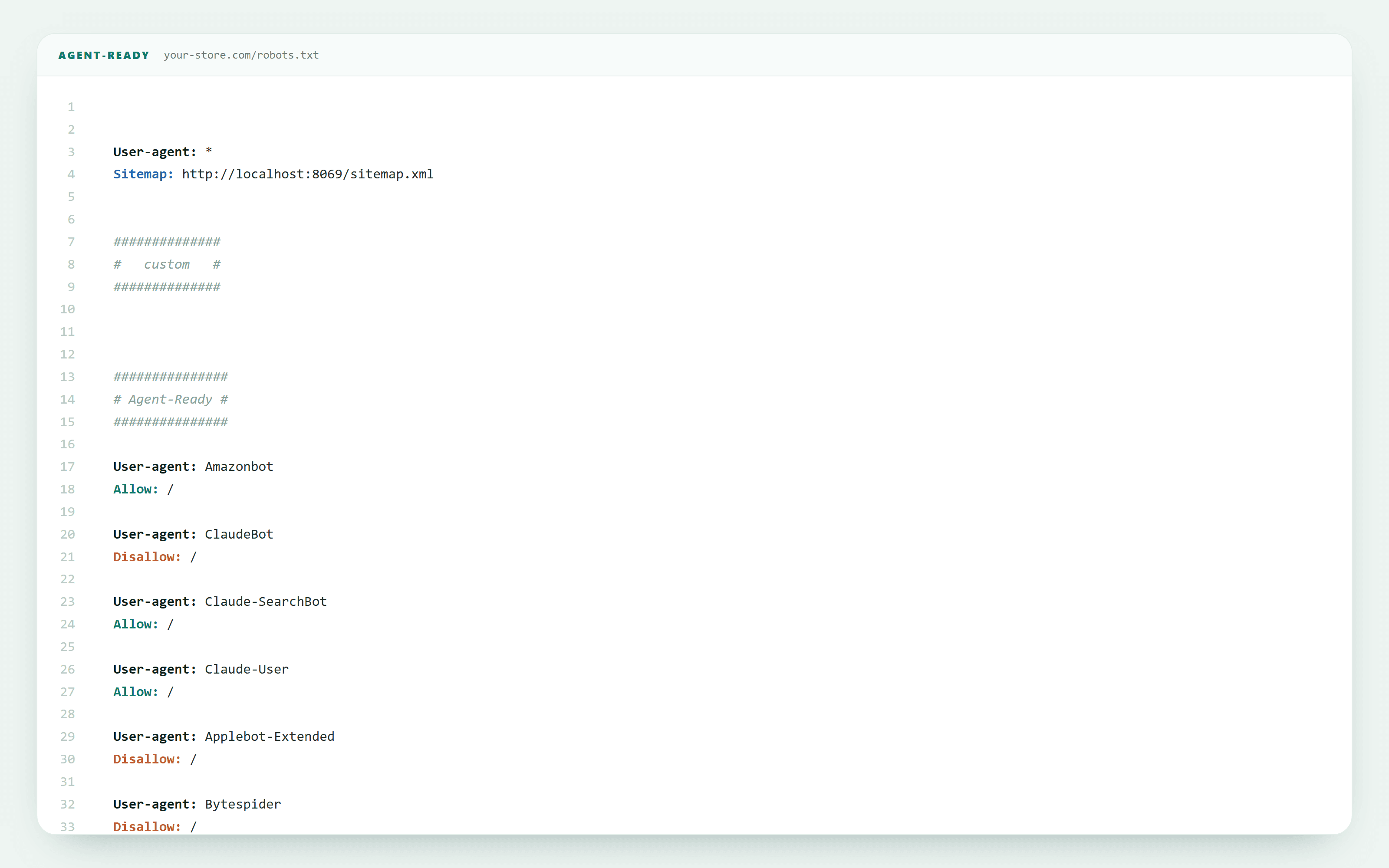
The registry writes matching Allow / Deny blocks into your /robots.txt based on each bot's User-Agent token and Policy.
It appends these blocks — it does not overwrite or remove your existing robots.txt rules. The result is a transparent, auditable robots.txt you can read and verify.
Analytics
Agent Traffic
The log of who actually visited — real requests from AI agents, grouped by agent, page, product, website, response code and verification status.
This is the “which AI bots came to my store” view — the Registry is not.
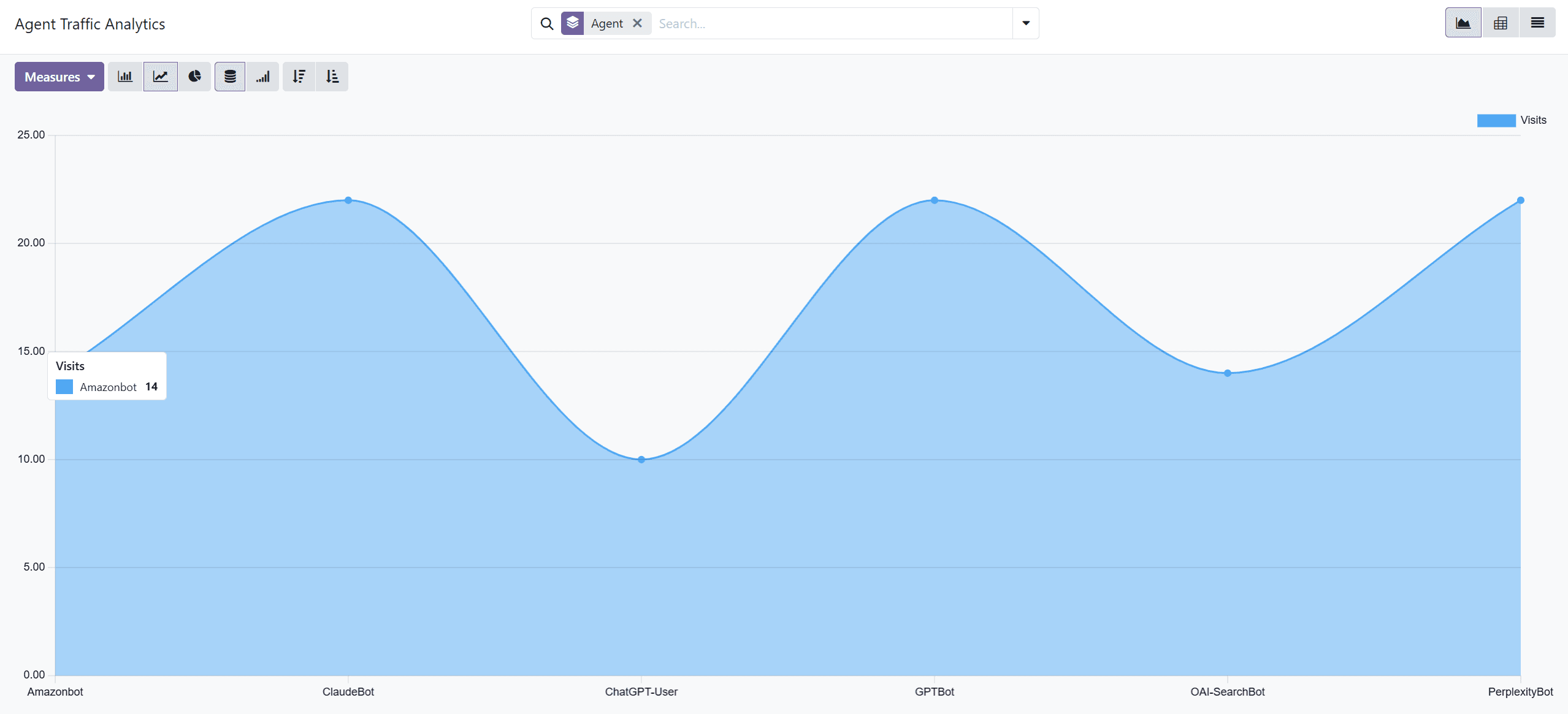
What gets logged — the honest scope
A visit is recorded only if either (1) the request's User-Agent matches a Registry entry (a known bot), or (2) the request carries Web Bot Auth signature headers (a self-identifying signed agent).
A brand-new bot that is neither known nor signed is NOT logged — a deliberate privacy-first choice (logging every request would capture all human visitors' IPs and user-agents = PII plus noise). To discover new unsigned bots, check your web-server access logs, then add them via the Registry's New button.
Field reference
| Field | Meaning |
|---|---|
| Agent | The Bot Registry record that matched this request, when known. |
| Verified Signature | Whether the request signature verified against the agent’s published Ed25519 key. |
| Bot Auth Headers | Whether the request carried HTTP Message Signature bot-auth headers. |
| Declared Agent Domain | The Signature-Agent domain declared by the requester, when present. |
| Verification Status | Declared by User-Agent / Verified signed agent / Signed but not verified. |
| URL | Visited storefront path (query strings omitted to keep analytics privacy-lean). |
| Product / Category | The product or category page viewed, when the request resolved to one. |
| Website | Website that served the request. |
| Timestamp | When Agent-Ready logged the request. |
| Response Code | HTTP status returned to the agent. |
| (IP) | Stored hashed or truncated — never the raw IP. |
Public files
llms.txt & llms-full.txt
A concise, factual map of your store, published where agents look for it.
/llms.txtStore context, product categories, featured products, policy facts, support details and sitemap links. Live automatically after install.
/llms-full.txtAn optional, larger file that also exposes product lines. Enable it with the Enable /llms-full.txt toggle in Settings.
schema.org
Structured data (JSON-LD)
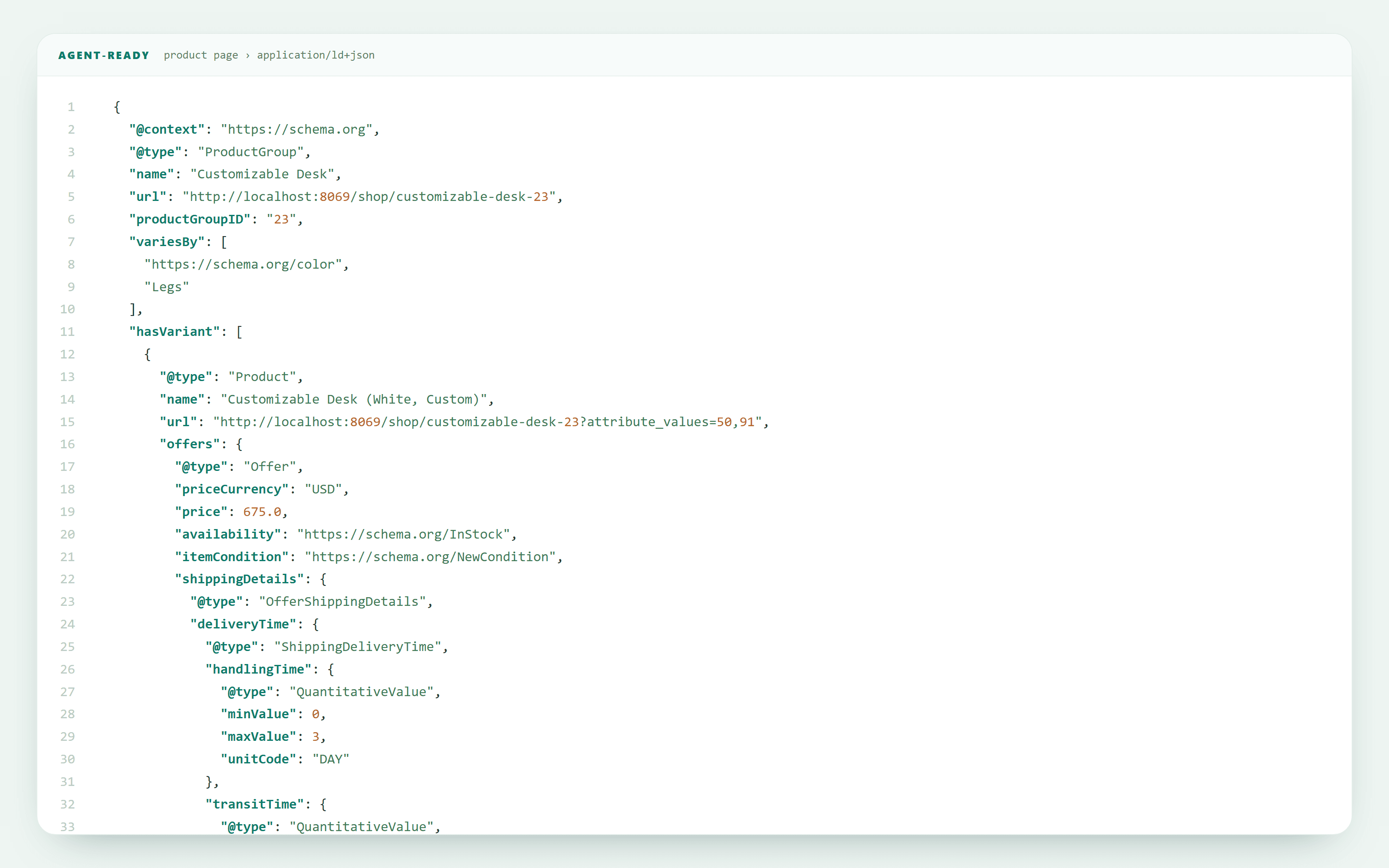
Agent-Ready injects standards-compliant JSON-LD, validated against Google's Rich Results Test.
- Product / ProductGroup on product pages, with Offers (price, currency, availability, valid GTIN when present) and shipping & return details derived from your Policy Facts. Multi-variant products emit a ProductGroup with
hasVariant+variesBy. - ItemList on category pages.
- Organization and WebSite site-wide.
Single source of truth
Verification
Web Bot Auth (log-first)
Requests carrying HTTP Message Signature bot-auth headers are checked against the declared agent domain and labelled in analytics.
Phase 1 is log-first: verification informs measurement and never blocks shoppers or agents.
Privacy & data
Built privacy-first
Buyers care about this — so here's exactly how Agent-Ready handles data.
- Runs entirely inside the merchant’s Odoo database; no external SaaS/hosted service.
- No cookies and no behavioral tracking for agent analytics.
- Only known-bot or signed-agent requests are logged (not human traffic).
- Stored IP data is hashed or truncated; URL query strings are stripped.
- Log retention cleanup is configurable (Agent Visit Retention).
FAQ
Questions, answered
The real questions merchants ask before and after installing.
It makes your Odoo website_sale store legible, verifiable and measurable for AI shopping agents — without changing anything human shoppers see. It publishes an llms.txt map, emits complete schema.org JSON-LD, lets you enter Merchant Policy Facts once, gives you an AI Bot Registry plus robots.txt control, verifies signed agents, and logs Agent Traffic analytics with a 100-point Readiness Score.
No — that’s Agent Traffic. The Registry is the list of known bots plus your allow/deny policy (it defines and governs bots; it feeds robots.txt and lets analytics recognize bots).
They’re pre-seeded common AI crawlers so you’re governed and measuring immediately; change any Allow/Deny as you like.
To add brand-new bots that aren’t seeded yet, so they get a robots.txt rule and are recognized in analytics.
Only if it’s in the Registry or it sends a Web Bot Auth signature. Unknown and unsigned bots aren’t logged (privacy-first). Find them in your server access logs, then add them via the Registry’s New button.
No. Human shoppers see the exact same storefront; the added signals are machine-readable only.
No. It runs inside your Odoo; no external SaaS, no cookies for analytics, IPs hashed or truncated, configurable retention.
17.0, 18.0, 19.0 (Community & Enterprise). Requires website_sale.
It’s fail-open by design — any error degrades silently and never breaks your storefront.
Complete each Readiness checklist item: publish llms.txt (automatic); fill Policy Facts; publish products so JSON-LD samples pass; keep the bot registry active; ensure the product sitemap is reachable; and record a first agent visit.
Support
Still have a question?
We build and support Agent-Ready ourselves. Reach the lab directly — real answers from the people who wrote the code.
Vendor: RubyLabz · See also the product overview